Components support scripted events to handle things like mouse clicks, etc and those are described in section 7.4.6. The most common event is the mouse click, and there are several common events that applications use when a component is clicked. To save you from having to script these, components have a set of Basic Actions. This is the second item in the properties list:
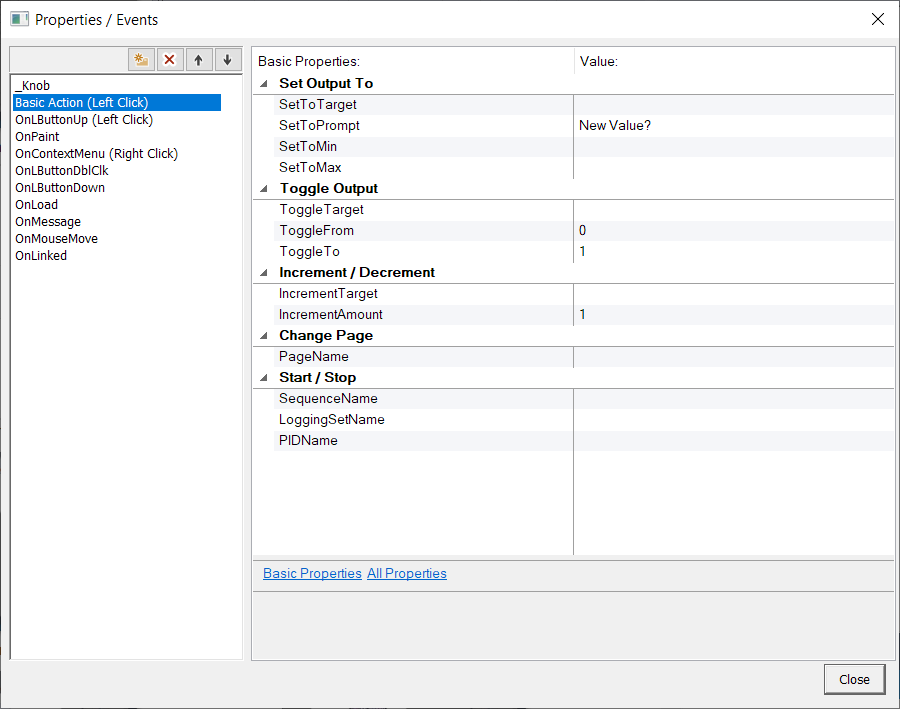
There are several possible actions you can perform, and you can even have a single click perform multiple actions, though you won't be able to predict the order they are performed. The basic actions do not override the OnLButtonUp event, so if you have script there, that will execute as well.
Most actions are enabled by providing a target or name, and disabled by clearing out that field. All actions are disabled by default.
Set Output To:
This action will prompt the user for a new value and update the target to that new value.
SetToTarget: the channel or variable that will be set with the entered value. Leave blank to disable this action.
SetToPrompt: the message displayed in the popup when the new value is requested.
SetToMin: if specified, the minimum value that can be entered (inclusive)
SetToMax: if specified, the maximum value that can be entered (inclusive)
Toggle Output:
This action will toggle the given target channel or variable between the two specified values with each mouse click.
Toggle Target: the channel or variable that will be toggled. Leave blank to disable this action
ToggleFrom: the first value the target will be toggled between, or the value assigned if the target is empty or has a value other than ToggleTo.
ToggleTo: the second value the target will be toggled between.
Increment / Decrement:
This action will increment or decrement the given target channel or variable by the given amount.
IncrementTarget: the channel or variable that will be incremented or decremented. Leave blank to disable this action.
IncrementAmount: the amount the target will be changed. Use negative values to decrement.
ChangePage:
This action will change the currently displayed page to a different page or pages.
PageName: the name of the page(s) to switch to. If specifying multiple, overlapped pages, list them all separated by commas. Leave blank to disable this action.
Start/Stop:
These actions will start (if stopped) or stop (if started) the given item. Leave the item blank to disable that action.
SequenceName: the name of the sequence to start and stop
LoggingSetName: the name of the logging set to start and stop
PIDName: the name of the PID loop to start and stop